Workday · Generative AI
Talent Highlights
A Rising 2023 concept that didn't resonate with users – and what we built instead.
Role
Timeline
Team
Lead product designer
GA release • May 2025
Product, ML, eng, research
Context
In 2023, GenAI was becoming a major strategic focus across the industry, and Workday's Talent Optimization team was asked to create a concept for Rising (annual customer conference), showcasing how AI could support managers in talent and career conversations.
I had just joined the Talent Optimization team following a re-org, and this was my first project in a new product area. Within months of ramping up, I was designing an innovative GenAI concept for one of Workday's highest visibility events of the year.
Initial Direction
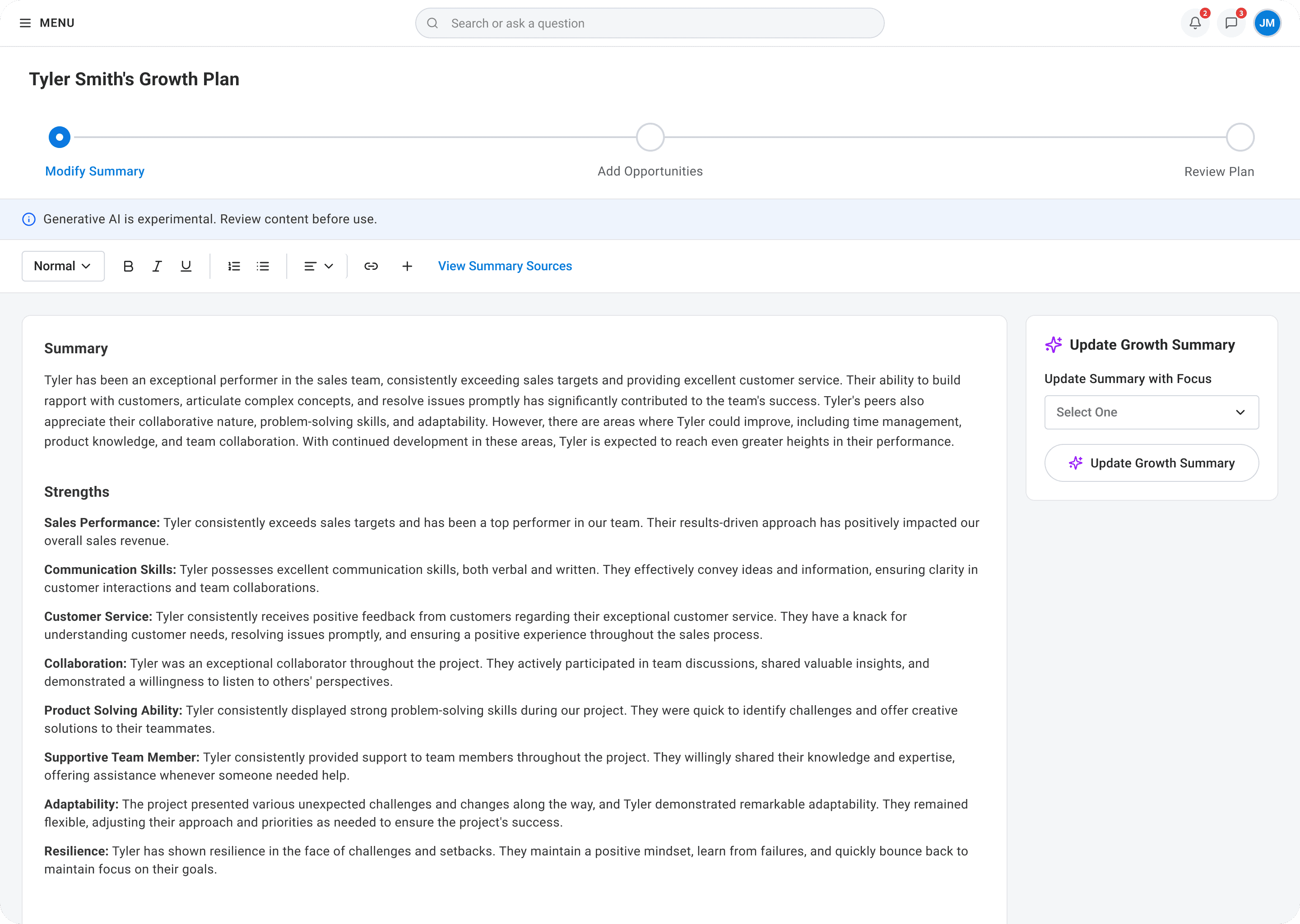
The initial direction came from product leadership to create a concept using GenAI to help managers create growth plans for their employees. The AI could synthesize everything Workday knows about an employee and generate a personalized development plan, saving managers time and helping employees grow. I designed and prototyped the concept for Rising 2023, while working quickly under a tight timeline with significant stakeholder visibility.
Initial concept
What We Learned
When we shared the Growth Plan concept with customers in design partner groups and conducted user research, it didn't resonate. Based on this feedback, the team made the call to stop iterating on the Growth Plan concept and to go back to the drawing board.
Managers weren't the right initiators
Research showed growth plans should start with the employee, not the manager. Managers wouldn't draft one without first understanding what their direct report wanted.
It felt like more work, not less
Customers worried Growth Plans would become another 'to-do' on managers' plates and that managers would preemptively assign work to employees without their input.
The AI angle alone wasn't enough
Even though managers were interested in GenAI, the concept didn't map to how they actually worked. The technology wasn't the problem – the use case was.
The Pivot
Rather than forcing a use case to fit the technology, we looked at feedback from DPG sessions and market research, which surfaced a more fundamental problem:
Managers weren't having career conversations with their employees consistently.
Not because they didn't care, but because they were overworked, didn't know where to find the relevant data when they needed it, and many didn't know how to even begin the conversation.
This is where our product manager's leadership reshaped the project. Rather than continuing to iterate on Growth Plans, she drove the team to define a new use case grounded in what we'd actually heard from managers:
As a manager, I want to spend less time navigating my workers' talent data, so I can spend more time having career conversations with them.
From there, I designed and prototyped three concepts and we tested them in DPG sessions. The one that resonated most – what would become Talent Highlights – used AI to synthesize an employee's talent data into a concise summary of strengths and growth opportunities, giving managers a real starting point instead of a blank page.
Concept 1 – Conversation Starters
AI synthesizes an employee's talent data into a concise summary of strengths and growth opportunities, giving managers a starting point for career conversations.
Outcome: Resonated most strongly. Managers wanted exactly this kind of starting point and described it as complementary to their existing workflow.
✅ Moved forward
Concept 2 – Integration into Another Product Area
AI-generated content surfaced inside an existing check-in workflow managers already used, so the value would show up where they were already working.
Outcome: Strong concept, but required cross-product coordination we couldn't guarantee within the EA timeline.
Didn't move forward
Concept 3 – Employee Initiated Career Path
Employees initiate their own career path, and AI surfaces relevant context to their manager when it's time to discuss it.
Outcome: Positive feedback and aligned with research showing employees should initiate growth conversations. But feature value depended on employee-side adoption first.
Didn't move forward
Key Decisions
Decision 1: Why we pivoted from the Growth Plan concept
Context
The Growth Plan concept had leadership buy-in and had already been prototyped for Rising 2023, Workday's annual customer conference. Walking away meant abandoning a concept the company had already shown publicly and there was pressure to keep iterating rather than start over.
Decision
The research was clear enough that the team chose to pivot. Rather than trying to fix a concept that didn't match real manager behavior, we used that feedback to reframe the problem from scratch, even though it meant losing the work that had already been done.
Impact
That reset led directly to Talent Highlights which was a concept that addressed a real user pain point and was later validated in concept research, where participants described it as complementary to existing workflows rather than another thing to manage. It also became a lesson for the team that we shouldn't build a feature just because we can use AI in it.
Decision 2: Choosing detailed content over a summary
Context
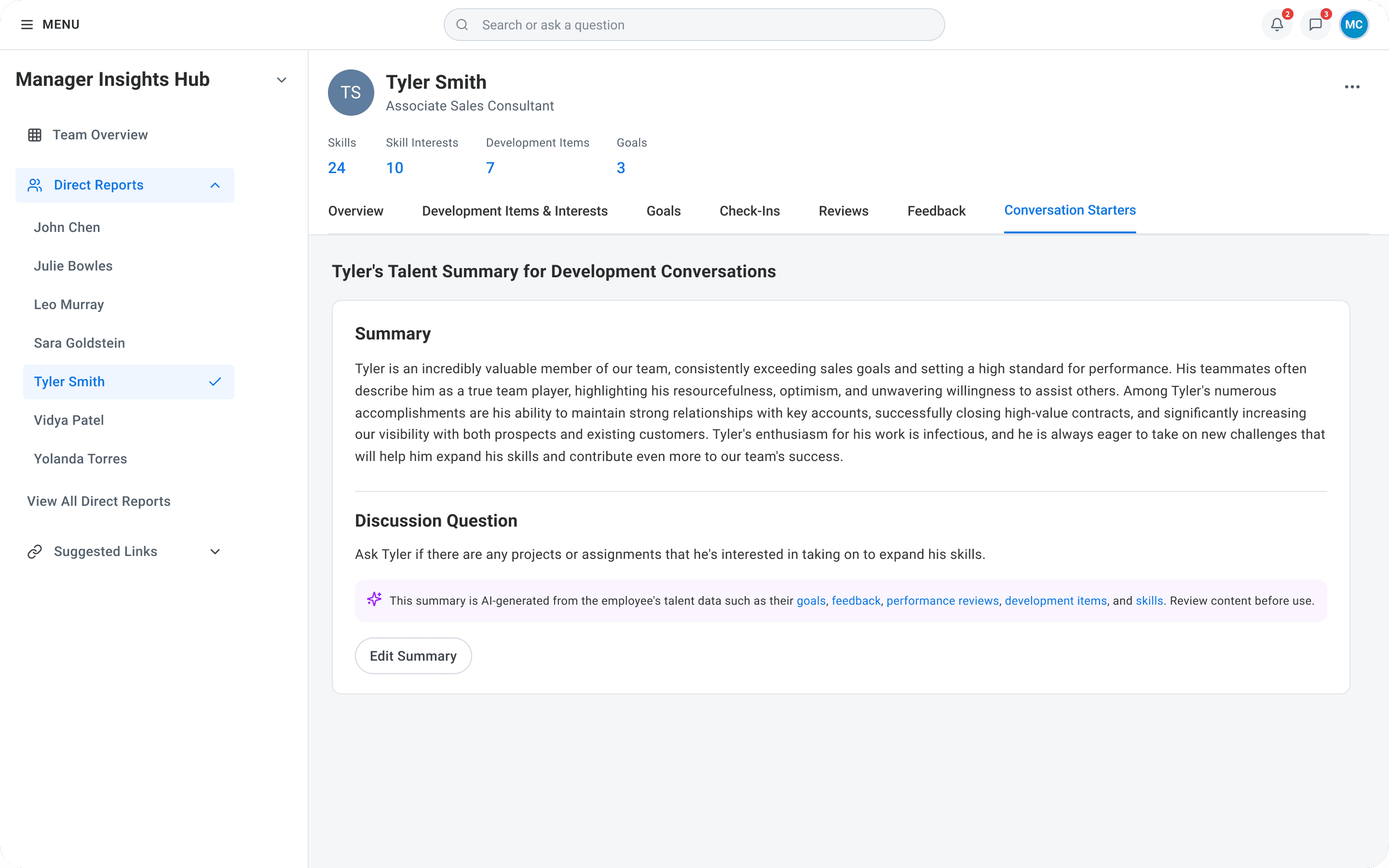
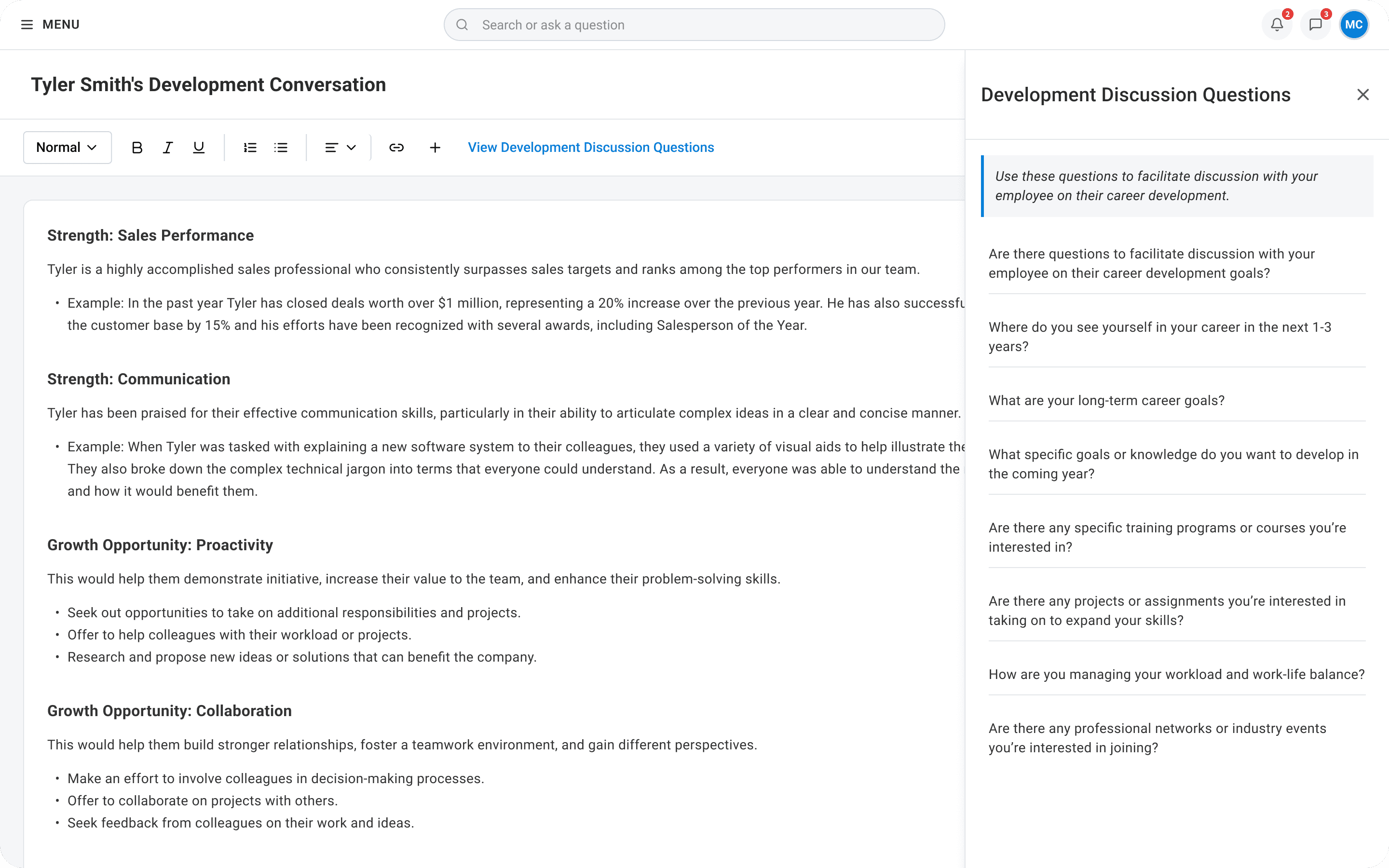
As the concept evolved, we tested two versions of the AI-generated content: a longer, detailed summary with specific strengths and growth opportunities, and a shorter, condensed summary with a single discussion question. The team leaned toward the shorter version – managers were already overwhelmed, and we assumed a quick scan would be more useful than another wall of text. The research said the opposite.
Summary
Detailed content
Decision
All 6 participants in our concept study (March 2024) unanimously preferred the longer, detailed content. The shorter content was seen as too simplistic and at risk of oversimplifying how an employee was actually doing. We moved forward with the detailed format.
Impact
This decision shaped the final product. Talent Highlights surfaces up to five strengths and five growth opportunities, each with supporting context. This gives managers a starting point to have a genuinely informed conversation rather than a surface-level one.
Decision 3: Establishing visible data sources as an AI transparency standard
Context
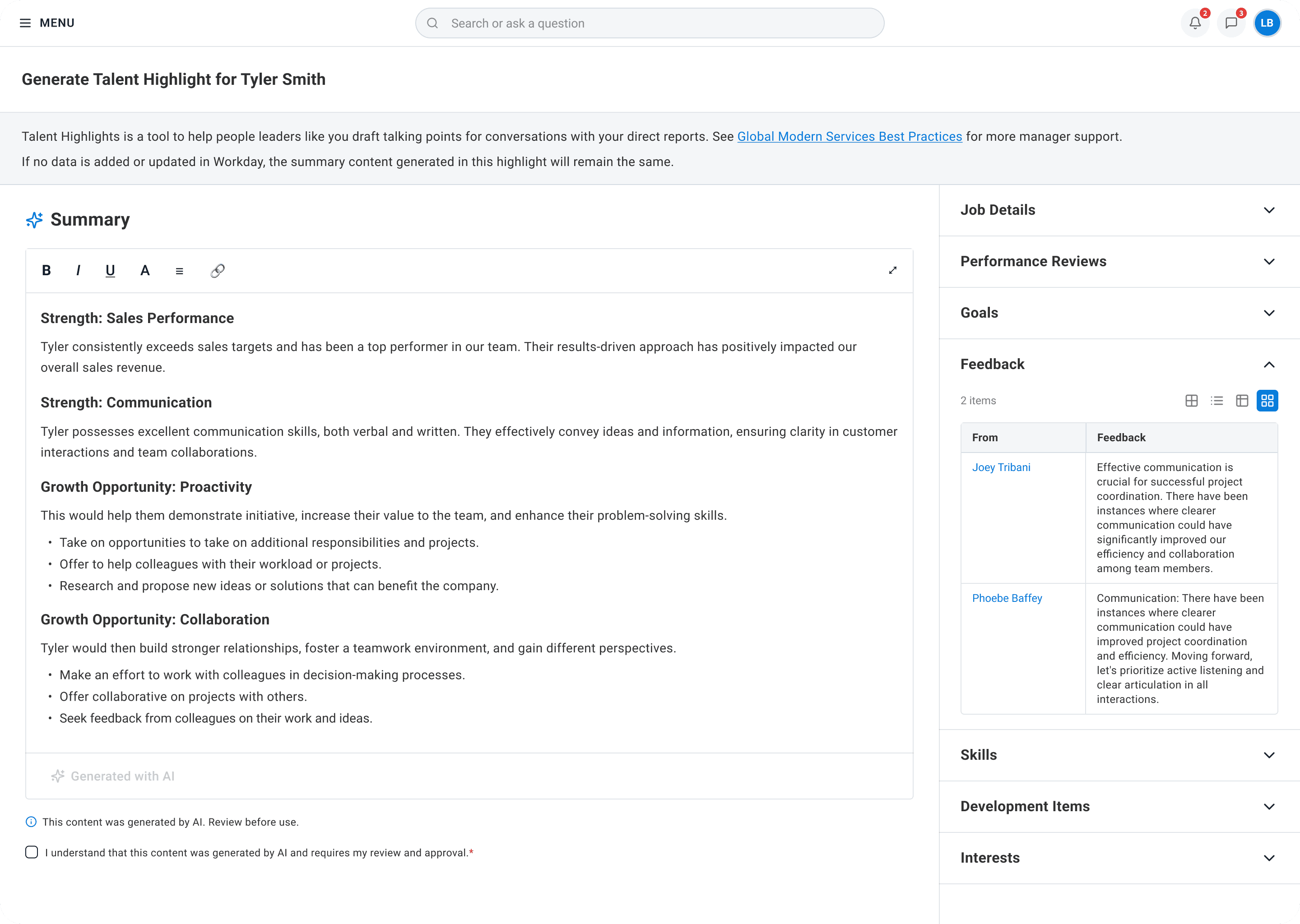
For something like an AI-generated job requisition, a tooltip might be sufficient. But Talent Highlights pulled from many sources per generated summary (performance reviews, feedback, goals, development items, and skills) and research showed managers wanted to verify the content in order to trust it.
While we were designing Talent Highlights, I was part of a cross-team design group working on AI patterns across Workday. The initial proposal was an info icon that opened a tooltip listing the sources used to generate the content.
In production
Decision
I pushed back on the tooltip for our use case because it couldn't surface the volume of citations managers actually needed. I advocated for a dedicated data sources panel visible alongside the generated content, paired with a confirmation checkbox requiring managers to acknowledge they'd reviewed the output before saving.
Impact
In concept research, participants explicitly identified checking sources and editing as critical to manager trust. The panel-and-checkbox pattern became Workday Talent Optimization's standard for AI transparency and was applied to Performance Management Agent.
Outcome
Talent Highlights was released to all Workday customers in May 2025, becoming the Talent Optimization team's first GenAI feature to reach general availability.
Since launch, Talent Highlights has been adopted across hundreds of customer tenants with consistent week-over-week usage which indicates strong repeat engagement rather than one time exploration.
Reflection
This project shaped how I think about AI design. The original Growth Plan concept had everything going for it (leadership buy-in, a visible launch moment, a compelling AI story), and it still failed because it was built around the technology first and user needs second.
The pivot wasn't easy. Walking away from a concept that had already been prototyped and shown at a major conference required conviction from the team and a willingness to take research seriously even when it contradicted the direction we'd already committed to.
What I learned is that enterprise users don't want innovation for its own sake. They want their work to feel less heavy. If AI genuinely reduces effort on something they already need to do, they'll embrace it. If it adds steps or feels like a tool looking for a problem, they'll ignore it, no matter how technically impressive it is.
Now, on every AI project, the first question I ask isn't "what could AI do here?" It's "what task is the user already doing that feels harder than it should?" If I can't answer that clearly, the AI isn't ready to be designed.